I’m working on a simple flow in Analytics Builder where:
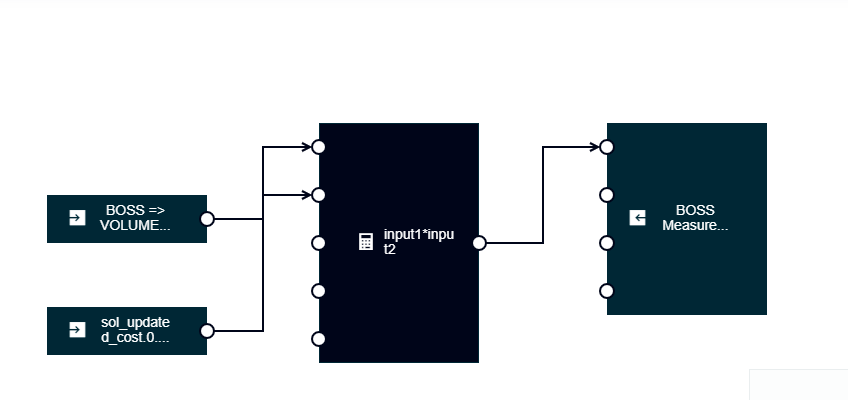
I take an input measurement (e.g., from type Demo),
Fetch a value from the Managed Object (e.g., updated_cost.0.cost),
Multiply the two values using an Expression block,
And write the result as a new Measurement in a custom fragment (Cost.Total).
It’s working functionally — however, I noticed that the timestamp of the calculated output measurement doesn’t match the timestamp of the original input measurement.
As you can see, the output measurement timestamp (08:40:51) does not match the input measurement timestamp (08:40:10).
For my use case, I need the calculated measurement to carry the same timestamp as the original input measurement.
Question:
How can I ensure that the output measurement generated by Analytics Builder uses the same timestamp as the input measurement? Is there a configuration or workaround for this?
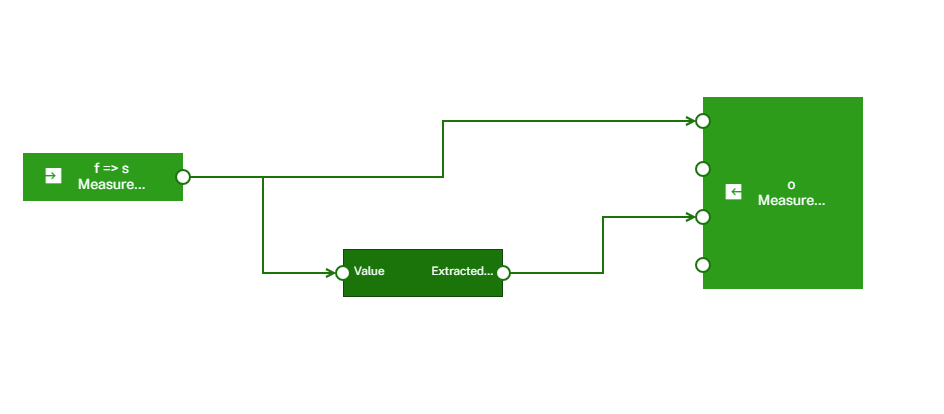
Yes, the CreateMeasurement block allows you to set the timestamp of the measurement using the Time input port. If this port isn’t connected, the block defaults to using the current model time.
For more details, please refer to the official documentation here:
When the model is first activated, it correctly calculates and outputs one TOTAL_COST entry.
However, after new measurements are received from the device, it repeatedly outputs 9 TOTAL_COST calculations every time. How to sure Only one TOTAL_COST is calculated for each new measurement instead of 9 duplicates?
Hi Vikash, do you have one measurement that includes all values at the same time or are these separate ones? Also, are there any updates happening on the ManagedObject you are using?
Basically any changes in input (Measurements or ManagedObject) would result in a new Activation of your model and thus you would see an ouput being produced every time.
Can you say how often your measurements arrive and when exactly you want to get the sum?
Based on your model, you’re listening to 15 different fragment and series measurement inputs, which are connected to an expression block. According to the behavior of the expression block, any change in the input values triggers a recalculation of the expression defined in its parameters. This results in multiple output measurements being generated.
However, only the input measurement BOSS => volumeDispensed1 is connected to the time port of the “Create Measurement” block. As a result, the output measurement carries a source timestamp of this specific input is received.
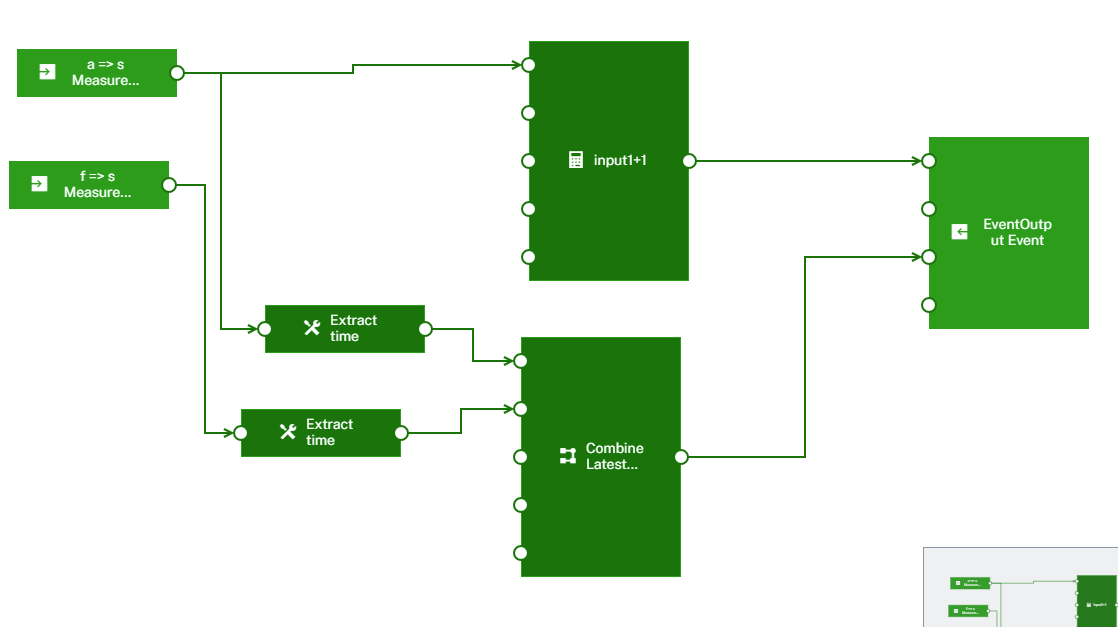
You can try combiner block with mode “LatestInput“ .
@Sudha_Jallu I have already tried using Combined Latest, but the issue still persists. Currently, I’m getting five extra cost calculations with the same timestamp. As I mentioned earlier, the model works fine right after a restart, but once a new measurement is sent, the same issue reappears.
Just following up on the issue I previously raised. I’m still encountering multiple cost calculations.I tried using combineLatest, but unfortunately, that hasn’t resolved the duplication.
Could you please take another look or advise what else might be causing this behavior?
As previously explained, the Expression block recalculates its defined expression whenever any of its in-use input values change—after all required inputs have been received.
When the model is first activated, it waits until all 15 input measurements are available before performing its initial calculation. At that point, it outputs a single TOTAL_COST value, as expected.
However, once the initial measurements are in place, any update to one of the 15 inputs triggers the Expression block to recalculate. Since it responds to each individual input change, this results in multiple TOTAL_COST outputs—one for each updated input—leading to the repeated calculations you’re observing.
To validate this behavior, I created a model similar to your use case and ran a test. Initially, I sent measurements with fragments a through a8 as inputs. Once all were received, the model produced one output measurement, confirming the expected initial behavior.
Then, I sent a new measurement to just one of the inputs, and the model generated a new output measurement in response. This confirms that once the input set is complete, any subsequent update to an input triggers recalculation and output.
This behavior is consistent with how the Expression block is designed—it reacts to input changes and recalculates accordingly.
I recommended using a Combiner block, not to reduce the number of TOTAL_COST outputs, but to ensure that each output carries the specific timestamp of the input measurement that triggered it.
*However, after new measurements are received from the device, it repeatedly outputs 9 TOTAL_COST calculations every time. How to sure Only one TOTAL_COST is calculated for each new measurement instead of 9 duplicates?
*
You mentioned that the model outputs 9 TOTAL_COST values for each new measurement received. However, I’m not observing this behavior in the block I tested.
With my model, after sending the initial set of measurements (e.g., a through a8), the model produced a single TOTAL_COST output. Then, when I sent a new measurement to just one input, it triggered exactly one new TOTAL_COST output—consistent with the expected behavior of the Expression block.