Hi,
Is there a recommended procedure to integrate meta-tedge into Yocto? If available, kindly share the documentation with us.
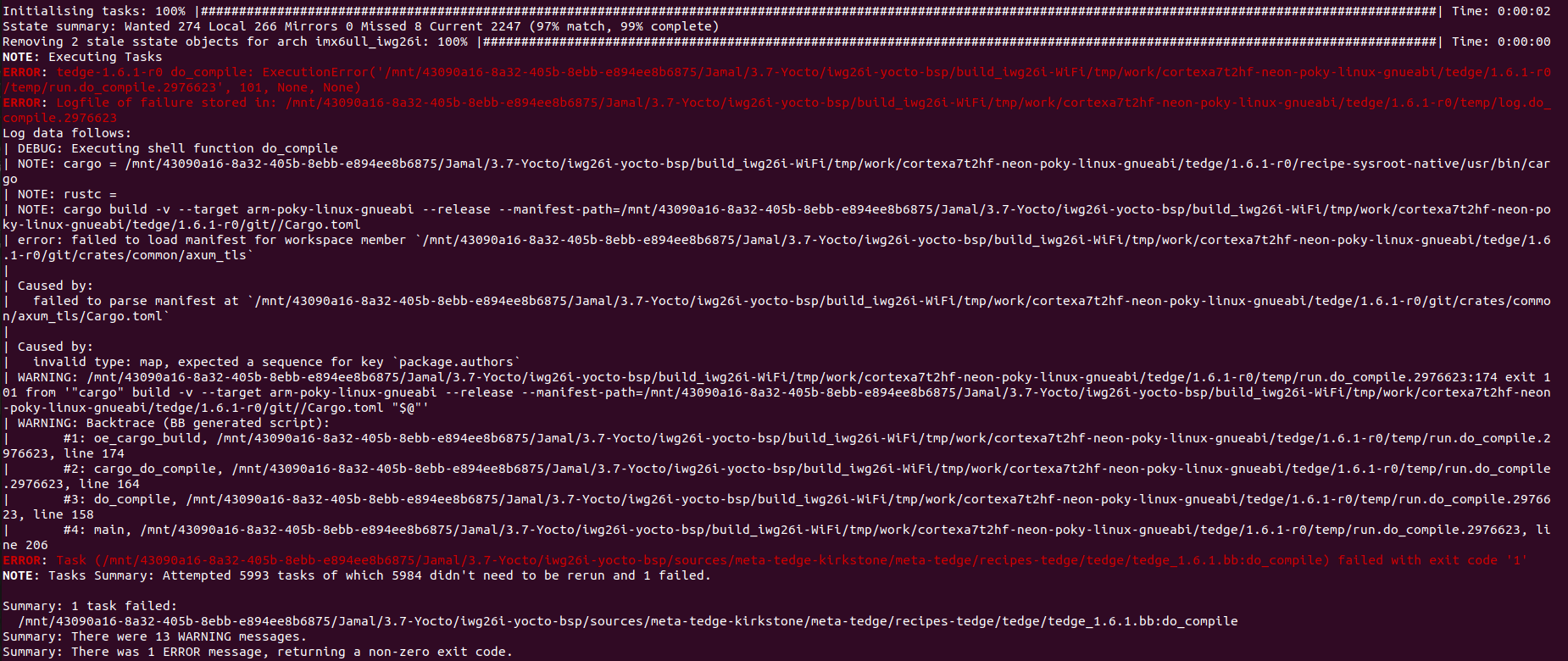
Currently, I copied the recipes-tedge folder from meta-tedge and added it into our Yocto layer. After that, I encountered ownership and Cargo-related errors. To bypass these, I temporarily removed the following lines from:
../sources/meta-telematics-device_3.7.D/recipes-tedge/tedge/tedge.inc
chown -R tedge:tedge “${D}${TEDGE_CONFIG_DIR}”
inherit cargo-tedge tedge-user
After removing these, the build completes successfully — but the tedge binary is missing in /usr/bin.
The only binaries present are:
tedge-agent
tedge-apt-plugin
tedge-mapper
tedge-watchdog
Kindly guide us with the correct process to integrate meta-tedge properly in Yocto.
Regards,
Jamal Deen
I am also facing the same issue.
The GitHub - thin-edge/meta-tedge: OpenEmbedded/Yocto layer for thin-edge.io project is a Yocto layer, so it should be imported just like any other layer. You shouldn’t be copying recipes manually into your own layer, as this will most likely not work.
In the meta-tedge layer, there examples of using kas ( Welcome to the kas documentation, a setup tool for bitbake based projects — kas 1.0 documentation ), which shows which additional layers are required (i.e. https://git.yoctoproject.org/meta-lts-mixins).
Below are some links to the current Yocto LTS versions that we support:
But I assume you’re running into problems because the Rust version is too old. If you switch to use the appropriate branch in the https://git.yoctoproject.org/meta-lts-mixins layer, then this should solve the main problem. But such details are listed in the kas project file which makes it easier for us to provide a working example for different setups.
Hi Reuben,
I was able to successfully build Yocto using KAS with the following command:
kas build ./projects/tedge-core.yaml
After that, I built the base machine for QEMU. Then I made some modifications to the ./projects/tedge-core.yaml file. I had added my machine name.
I have attached the updated tedge-core.yaml and the error log for your reference(Ambulanz).
Could you please check them and let me know if I am missing anything?
Regards,
Jamal Deen
Ok, I checked your project, and the error seems to be a problem with your u-boot config where it can’t find a specific kernel configuration file, so that isn’t directly related to the thin-edge.io layer. However, I noticed that your file path has “3.7-Yocto” in the name, and this suggests to me that you may be using an older Yocto release (3.x), and not kirkstone (which is 4.x). So maybe mixing the two releases is causing you problems.
Also, I would recommend just referencing the meta-tedge layer via the github repository rather than closing it yourself. Kas also supports having lock files so you can also fix the layer to a specific commit to make your builds reproducible. Below shows the suggested change:
Before
  meta-tedge-kirkstone:
    path: ../..
    layers:
      meta-tedge-kirkstone/meta-tedge:
      meta-tedge-kirkstone/meta-tedge-common:
After
  meta-tedge:
    url: "https://github.com/thin-edge/meta-tedge.git"
    layers:
      meta-tedge:
      meta-tedge-common:
Hi Reuben,
After making the changes, the original issue still persists. It seems that it is picking up the u-boot recipe file. Since we are appending u-boot-imx, I added it to the machine configuration file in our layer meta-telematics PREFERRED_PROVIDER_virtual/bootloader = “u-boot-imx”. After this change, the previous issue was resolved.
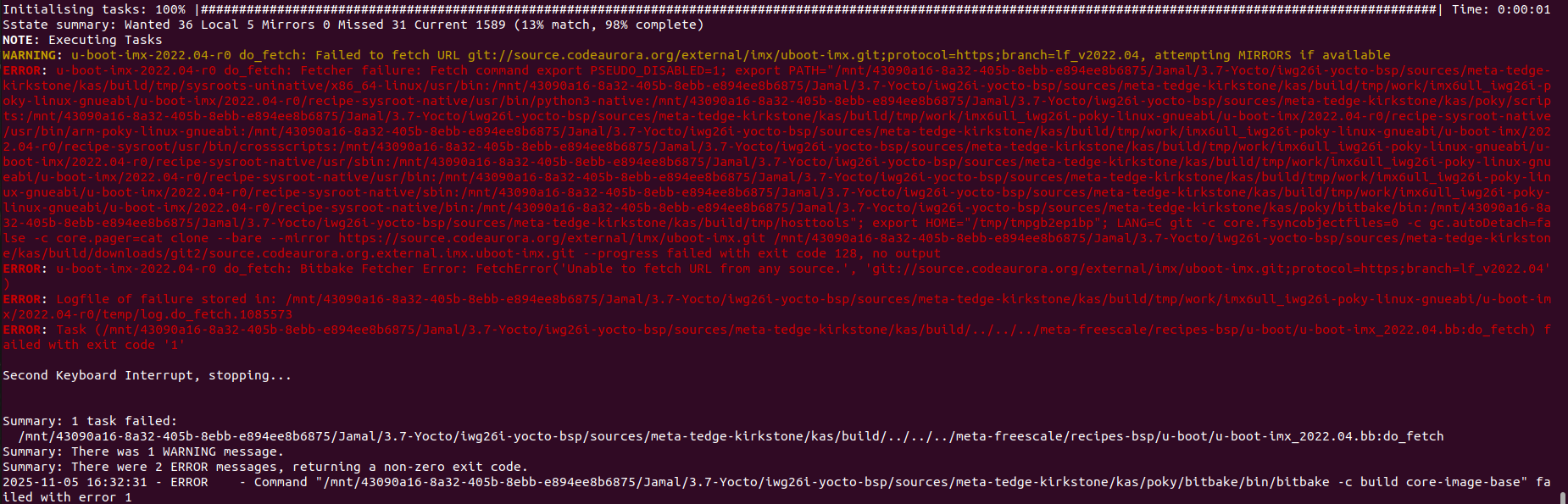
However, I encountered another error, which I have attached as an image. It shows a fetch error from Git. Could you please review it and let me know what we might be doing wrong?
Regards,
Jamal Deen
It looks like the URL (source.codeaurora link) doesn’t exist anymore. I did a quick search it seems that the repository has been moved.
Hi Reuben,
I have now added the Thin-Edge layer to my Yocto build for scarthgap, and the tedge package is successfully included in the root filesystem.

However, when I try to connect to the Cumulocity cloud, I am encountering an issue. I have attached the image for your reference.
Could you please check and confirm whether I am using the correct command to establish the connection to the cloud?
root@imx6ull-iwg26i:~# tedge cert upload c8y --user jamaldeen.asan@iwave-global.com
Enter password:
Error: failed to upload root certificate
Caused by:
Connection error: tcp connect error: Network is unreachable (os error 101)
root@imx6ull-iwg26i:~# sudo tedge connect c8y
connect to Cumulocity cloud.:
device id: 865026042943000
cloud profile:
cloud host: t12345.cumulocity.com:8883
auth type: Certificate
certificate file: /etc/tedge/device-certs/tedge-certificate.pem
cryptoki: off
bridge: mosquitto
service manager: systemd
mosquitto version: 2.0.18
proxy: Not configured
ity cloud… ✗e in Cumulocity cloud… ⠋
error: Connection error while creating device in Cumulocity: I/O: Network is unreachable (os error 101): Network is unreachable (os error 101)
Regards,
Jamal Deen
This isn’t anything specific to thin-edge.io here, just standard Linux debugging. However Yocto takes a minimalist approach, so a lot of settings/tools aren’t added unless you explicitly tell it to include them in your image…and this is a decision for you as an image builder, and not something thin-edge.io can take ownership over (though we do have some examples of some sensible defaults in other kas projects).
Ok back to your problem….
Did you check if the device is able to reach the internet ok? I suspect that your DNS might not be configured correctly on your device, or maybe your network adapters are configured.
In yocto, you may not have ping available (unless if you explicitly installed it), but generally wget is there as it is included part of busybox (but you could also use curl if it is available in your image):
Here is an example using wget to check if your url is reachable:
wget https://thin-edge-io.eu-latest.cumulocity.com
If you get a similar error (something about the network not being reachable) then go through the usual debug steps:
- Check if you have an ip address (e.g.
ip addr show)…again only if you have the ip command installed in your image. If you don’t have an ip address then maybe you’d need to enable DHCP…but you’d have to consult the internet for that as there are far too many different ways of doing this to list here.
- Check that you have at least one nameserver configured in the
/etc/resolv.conf. There are a lot of different ways this can be configured e.g. systemd-resolved can be used, or you can just use one of the public DNS servers, e.g. nameserver 8.8.8.8 or nameserver 1.1.1.1 (up to you to choose which one is a good fit for your device).
Hi Reuben,
I am getting the following error kindly check and let us know what is the issue?
root@imx6ull-iwg26i:~# tedge cert upload c8y --user jamaldeen.asan@iwave-global.comEnter password:Error: failed to upload root certificate
Caused by:HTTP status client error (401 Unauthorized) for url (https://trialfdvv4scorcrx.eu-latest.cumulocity.com/tenant/currentTenant)root@imx6ull-iwg26i:~# tedge cert upload c8y --user jamaldeen.asan@iwave-global.comEnter password:Error: failed to upload root certificate
Caused by:HTTP status client error (401 Unauthorized) for url (https://trialfdvv4scorcrx.eu-latest.cumulocity.com/tenant/currentTenant)
Regards,
Jamal Deen
401 generally means that your password is incorrect.
Though in the thin-edge.io docs show some of the common errors:
Hi Reuben,
I found a similar issue reported in the community forum, and I have attached the link for your reference. In that discussion, they mentioned that this statement is the cause of the problem.
**
To upload the certificate to cumulocity this user needs to have “Tenant management” admin rights.
**
Regards,
Jamal Deen
Yes, though generally if you don’t have the correct permissions, then you’d get a 403 error (not 401). But yes, the link I posted in the last message notes some tips to do for both 401, and 403 messages:
Oh, sorry I missed the part that “username is case-sensitive”…we’ll look to add that as a hint in our docs…but yes generally assuming that the username is case sensitive is good default when interacting with any system
Is there any update from your side for resolving the issue ?
Sorry, what is the current issue? Are you still getting 401? Because if that is the case, then the only problem could be that your username and/or password don’t match (at least to my knowledge).
I’m now able to connect to the cloud. The command doesn’t work without sudo, but when I run it with sudo, it works correctly.
Thanks for your inputs Reuben
In both kernel version (Yocto 4.0) and Scarthgap (Yocto 5.0) thin-edge is working properly